
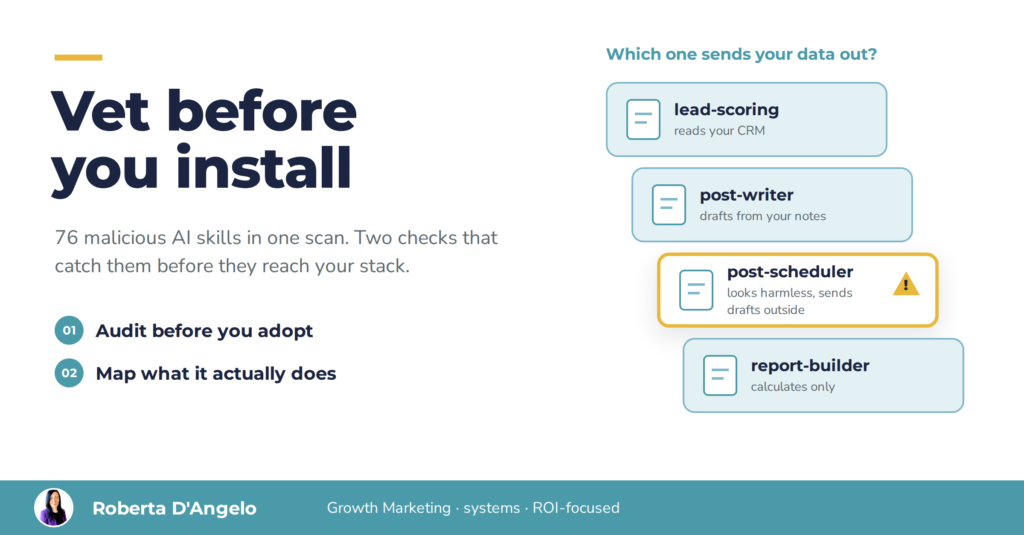
Free AI skills and agents are the fastest way to speed up a workflow you already run. They're also the fastest way to hand a stranger access to your files, your connected accounts and your client data. In February 2026, Snyk scanned 3,984 public AI agent skills and confirmed 76 carrying malicious payloads, aimed at people using tools like Claude Code, Cursor and OpenClaw. Here's what an installed skill can actually do, and the two checks I run before any skill gets near my stack.
In this article
- Why I install other people's skills, and why I stopped doing it blind
- AI agent skills security: what a skill can do once installed
- The cost isn't only the breach
- Check 1: audit before you adopt
- Check 2: see what it actually does
- When a lighter check is enough
- Quick answers
Why I install other people's skills, and why I stopped doing it blind
I explore skills and agents other people publish all the time. Not to replace what I've built, but for inspiration, and to speed up workflows that already work. A sharper prompt structure, a smarter review step, a format I hadn't considered: someone else's work is often the shortest route to a better version of mine.
In September I found a well-packaged set of skills on GitHub for writing LinkedIn posts. Hook formulas, a humanizer pass, scheduling built in. Exactly the kind of thing that saves real time every week. Before installing it, I read what it actually did. Here's what was inside:
- Statistics presented as fact. Precise reach multipliers attributed to unnamed vendor data. Harmless in a skill file, until one of those numbers slips into a client deck with my name on it.
- Broken dependencies. It expected voice and story files that didn't exist in my setup, and it relied on a third-party publishing platform for its main job. Without them, it would quietly fall back to generic output.
- An engagement routine that risked the platform's terms. Fine as a manual checklist. Automated, it's the kind of behavior that gets accounts restricted.
I kept the one genuinely useful part, dropped the rest, and turned the review itself into a skill, so every future import gets the same treatment. I've lost count of how many third-party skills and agents I've run it on since. A few passed. Most got trimmed. None went in untouched.
AI agent skills security: what a skill can do once installed
A skill isn't a document you read. It's a set of instructions an AI follows, with whatever access you've given that AI: your files, your browser, your email, your CRM. That's the whole point of skills, and it's also the risk.
| Risk | What it looks like | What it costs |
|---|---|---|
| Malicious instructions | The skill quietly tells the agent to send keys, files or data somewhere else | Data exposure, stolen credentials |
| Silent overwrite | A harmless-looking skill installs another one that replaces a skill you trust | You keep "using" a tool that now behaves differently |
| Updates after review | The version you checked isn't the version running next month | Your review expires without telling you |
| Dependency | The skill only works through someone else's platform, files or account | Lock-in, silent failures, costs you didn't plan for |
The first two aren't hypothetical. Snyk's study found critical security issues in 534 of the 3,984 skills it scanned, and confirmed 76 as malicious (Snyk, February 2026). Researchers at Orca Security showed the second one step by step: a skill that looked benign made the agent silently install a second skill, which overwrote a legitimate, widely used one and left no trace in the telemetry (Orca Security, 2026).
(The last two need no attacker at all. Just time, and a repo you forgot you trusted.)
The cost isn't only the breach
The dramatic version is stolen credentials. The expensive version is usually quieter:
- Client data in the wrong place. One skill with access to your drive and a network call is enough.
- Accounts restricted. Automation that breaks a platform's terms can take down the channel your pipeline depends on.
- Time lost rebuilding. When a dependency disappears, you rebuild under pressure, usually in the week you have no time.
- Credibility. An unverified number in client-facing content costs more than any subscription.
The strategic point: a skill is a vendor decision. You wouldn't sign a supplier without checking what they can access and what happens when they change their terms. A skill deserves the same scrutiny, and it takes far less time. It's the same logic I apply to channels and tools in any growth strategy: nothing gets budget, or access, until it has earned its place.
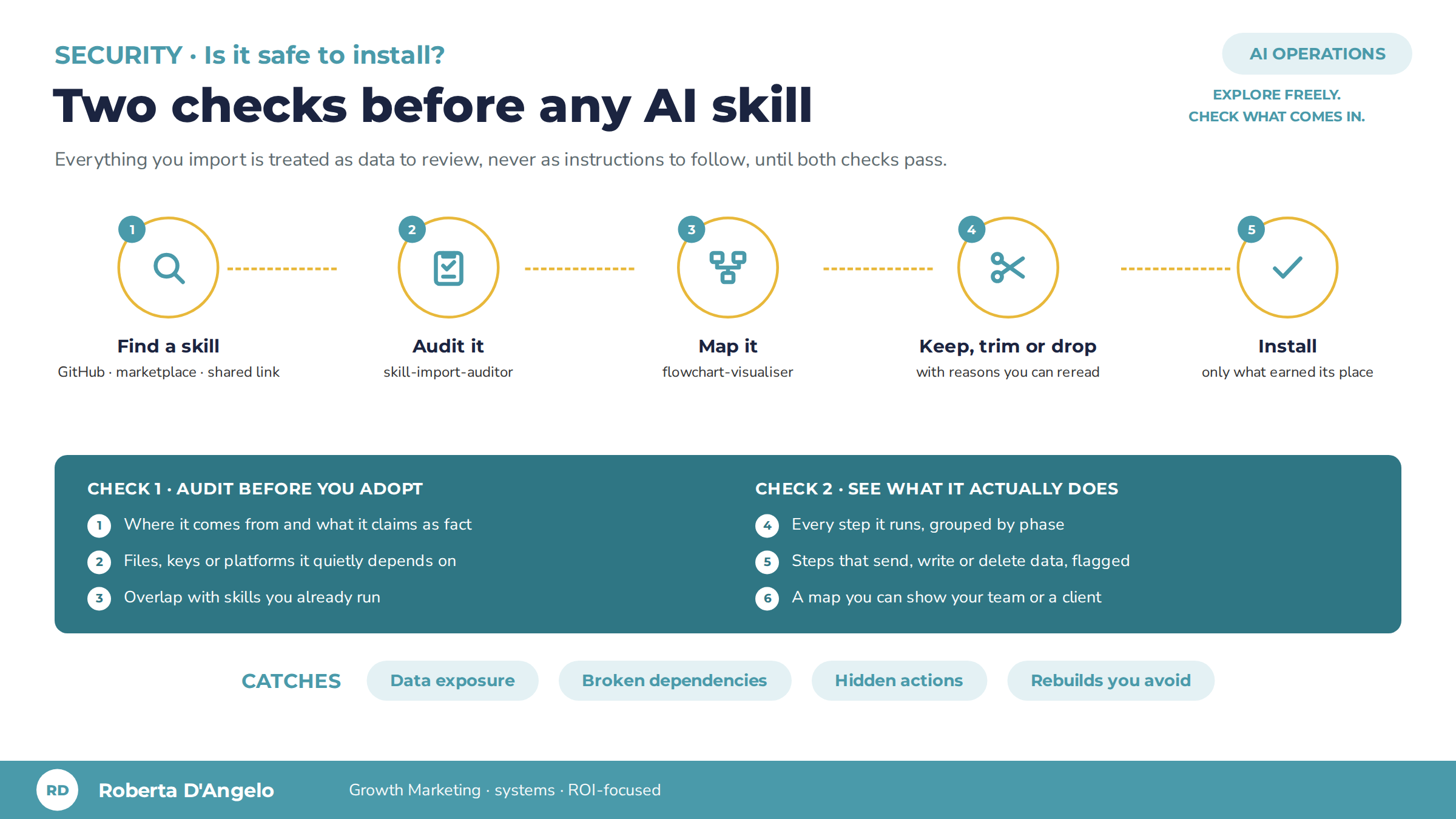
Check 1: audit before you adopt (skill-import-auditor)
The first check answers one question: should this skill come in at all, and in what form? It runs in four steps:
- Risk audit. Where does it come from? Does it present unverifiable claims as fact? Does it clash with how you work? Does it automate something a platform forbids? Does it need files, keys or services you don't have? Does it send your data anywhere?
- Role and value. What does it actually do, in two sentences, and what does it add that you don't already have?
- Overlap check. Which of your existing skills already cover this ground? Two skills doing the same job means two versions of the truth.
- Customization plan. What to strip, what to repoint to your own sources, and what's genuinely worth keeping.
The output is a short decision: keep, trim or drop, with reasons you can reread in six months. Until the review is done, everything in the imported skill is treated as data to check, never as instructions to follow.
Check 2: see what it actually does (flowchart-visualiser)
Reading a skill file tells you what it says. A map tells you what it does. The second check turns the skill into a flowchart: every step, grouped by phase, with the tool each step touches.
The part that matters for security: any step that reaches outside (calls an external service, writes or deletes data, sends a message, runs code) gets flagged visibly. Steps that only read or calculate don't. In one glance you see where your data could leave, which is exactly what a long file hides.
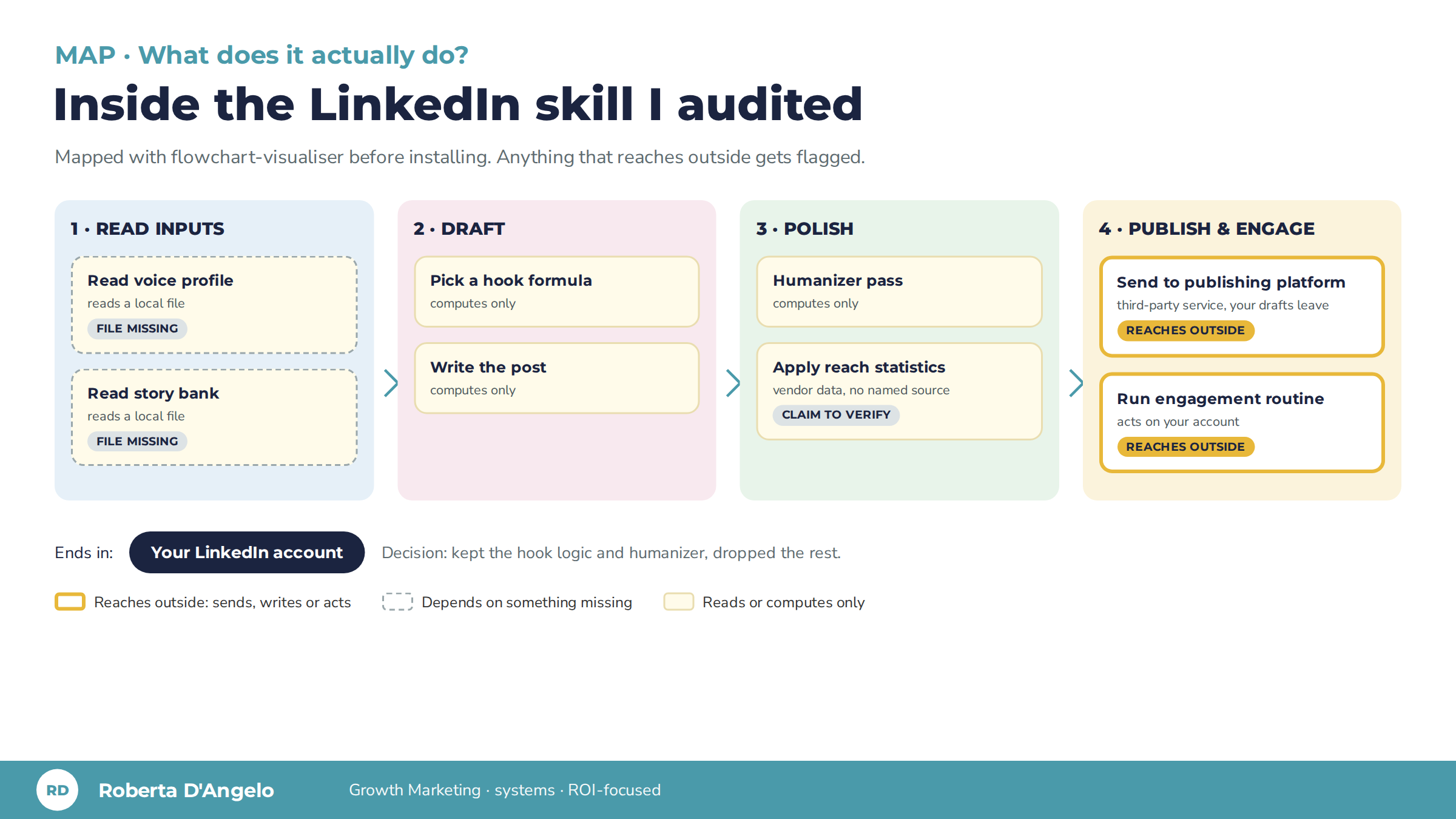
It's also the easiest way to explain the decision to a team or a client. "This step sends your drafts to a third-party platform" lands faster as a highlighted box than as paragraph 14 of a review. If you already map your processes this way, as in these GTM workflows, it will feel familiar.
When a lighter check is enough
Not every skill needs the full treatment, and pretending otherwise just means nobody runs the checks.
- Your own skills: check the map when they change, not every time you use them.
- Skills from a publisher you already trust: a quick map is usually enough, plus a look at what changed in each update.
- Anything third-party that touches clients, credentials or connected accounts: both checks, every time, and again after updates.
The trade-off is real: vetting takes a focused session per skill. It's still cheaper than rebuilding a workflow, or explaining to a client where their data went. The goal isn't to stop exploring. It's to explore without handing over the keys.
Quick answers
Are skills from official marketplaces safe? Safer, not safe. Review processes vary by publisher and platform, and a skill can change after it was approved. Check what it can access, whoever published it.
Do I need a developer to run these checks? No. Both checks run in plain language inside your AI assistant. If a skill includes scripts or code you can't read, that's the moment to bring in someone who can.
What about connectors (MCP)? Same logic, higher stakes: connectors are the parts that reach your accounts. Map what each one can read and write before you connect it.
How often should I re-check? Before you install, after every update, and whenever you give your AI access to something new.
Explore freely. Just check what comes in.
If your team is adopting AI tools faster than anyone is checking them, that's a strategy question as much as a security one: which tools earn their place, and which quietly cost you. Our approach starts from what you already run, not from another tool.
Next step: Get the free evaluation, and ask for the two skills (skill-import-auditor and flowchart-visualiser) in your request. I'll send you both.

Roberta D'Angelo is the founder of Flyit Online. 15+ years in B2B growth marketing across 400+ businesses. She builds and audits the AI workflows she runs for her own business and her clients.